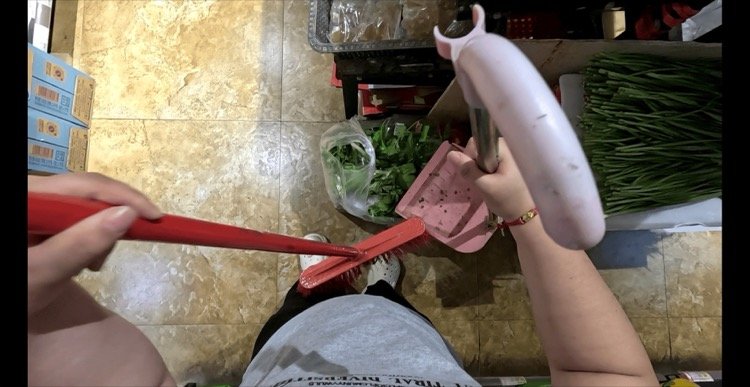
Powering Physical AI with Real-World Ego Datasets

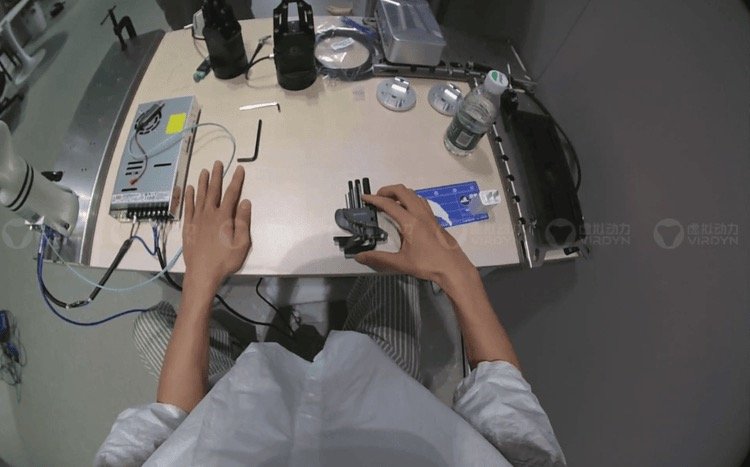
Video Annotation for Machine Learning and Embodied AI
Content Menu
● What Is Video Annotation for Machine Learning?
● Why First-Person Video Annotation Matters for Embodied AI
>> Human Demonstrations Are Not Robot Action Commands
● Step 1: Define the Learning Objective and Acceptance Criteria
● Step 2: Design a Video Annotation Schema
>> Write Rules for Ambiguous Events
● Step 3: Plan Representative Video Data Collection
>> Protect Participants and Sensitive Environments
● Step 4: Synchronize Multimodal Data Before Annotation
>> Distinguish Raw Measurements from Derived Outputs
● Step 5: Select Annotation Tools Around the Workflow
● Step 6: Run a Pilot Before Scaling Production
● Step 7: Measure Annotation Quality by Error Type
>> Combine Automated Checks with Human Review
● Step 8: Export Training-Ready Data and Prevent Leakage
>> Split by Recording Context, Not Adjacent Frames
● An Illustrative Warehouse Annotation Blueprint
● Combining Real and Simulated Data Responsibly
● How Virdyn Supports Video Annotation and Dataset Development
● Build Your Dataset Around the Task
>> What is the difference between video annotation and image annotation?
>> Does every video frame need manual labeling?
>> Can first-person video train a robot directly?
>> Which annotation format should a project use?
>> How much video data is enough?
>> How should a company evaluate a video annotation provider?
Video annotation for machine learning turns raw footage into structured examples that models can learn from. For robotics and embodied AI, however, identifying objects is only the beginning. Useful training data must also explain what happens over time, how hands interact with objects, and whether an action achieves its intended result.
My starting principle is simple: define the behavior you want to teach before deciding what to label. A warehouse robot learning to pick a package needs different supervision from a vision model detecting packages on a conveyor.
This guide explains how to build a reliable video annotation workflow, where first-person data adds value, and how Virdyn’s VDEgo data solutions can support collection, processing, and delivery.
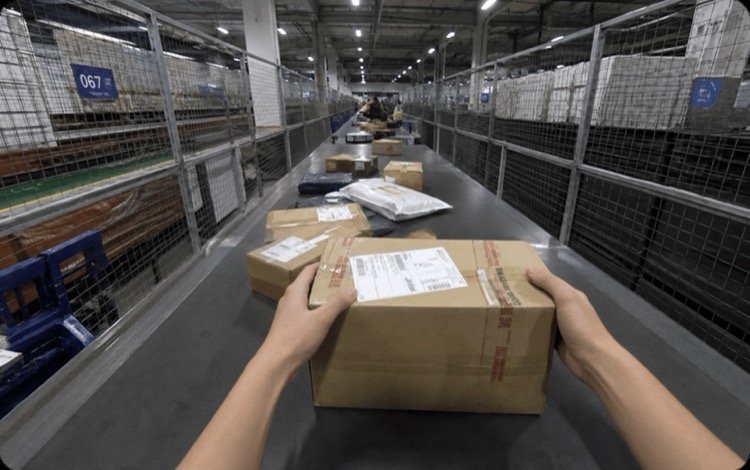
What Is Video Annotation for Machine Learning?
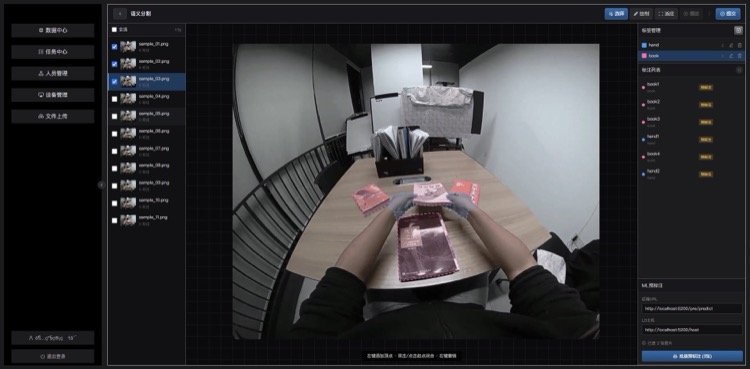
Video annotation assigns structured labels to objects, movements, events, and relationships across video frames. Unlike image annotation, it must preserve continuity: an object should retain its identity as it moves, becomes occluded, and reappears.
Common annotation methods include:
| Annotation method | What it describes | Typical application |
|---|---|---|
| Bounding boxes | Object locations | Package detection |
| Instance segmentation | Individual object boundaries | Cluttered-bin perception |
| Keypoints | Selected body or object landmarks | Hand-motion analysis |
| Object tracking | Identity across frames | Following moving containers |
| Temporal segments | Action start and end times | Pick-and-place recognition |
| Event labels | Contact, release, completion, or failure | Manipulation analysis |
The right combination depends on the model’s learning objective. More labels do not automatically produce a better dataset.
Why First-Person Video Annotation Matters for Embodied AI
Egocentric video records activity from the operator’s perspective. It can reveal hand–object interactions, changing viewpoints, and the visual context surrounding everyday tasks.
Ego4D demonstrates the research value of this approach, with more than 3,670 hours of daily-life video collected across 74 locations in nine countries. Its significance lies not just in volume, but in the diversity of activities and environments.
For commercial projects, that diversity must become a deliberate collection plan.
Human Demonstrations Are Not Robot Action Commands
First-person human video can support action understanding, representation learning, and task decomposition. It does not automatically provide robot joint commands, gripper states, or force measurements.
A vision-language-action model may require synchronized robot observations and actions beyond what a wearable camera captures. Similarly, world-model projects need clearly defined temporal prediction targets, not simply large quantities of footage.
Treat human demonstrations as one component of the training strategy—not a guaranteed replacement for robot-specific data.
Step 1: Define the Learning Objective and Acceptance Criteria
Begin with a task specification that connects business goals to measurable model behavior.
For a warehouse handling project, define:
-
Which objects the model must recognize.
-
Which actions it must distinguish.
-
What counts as successful completion.
-
Which failures need explicit labels.
-
Where the system must generalize.
“Recognize picking” is too vague. A more useful objective is: distinguish approach, grasp, lift, transport, placement, and release while maintaining the target object’s identity.
Agree on acceptance criteria before production. These should cover label completeness, geometry accuracy, tracking consistency, temporal boundaries, and delivery compatibility.
There is no universal accuracy threshold suitable for every project.
Step 2: Design a Video Annotation Schema
An annotation schema defines label names, attributes, relationships, and rules.
For manipulation tasks, separate four layers:
-
Objects: hand, carton, tool, container.
-
Actions: reach, grasp, lift, insert.
-
States: open, closed, empty, occupied.
-
Outcomes: completed, failed, interrupted, uncertain.
This separation prevents a single label from carrying several conflicting meanings.
Write Rules for Ambiguous Events
Consider “grasp start.” Does it mean first contact, finger closure, or the moment the object moves with the hand?
Choose one definition and provide examples. Include rules for partial visibility, simultaneous actions, unsuccessful attempts, and uncertain observations.
Never force annotators to invent hidden information. An “unknown” value is often more useful than a confident but unsupported label.
Step 3: Plan Representative Video Data Collection
Annotation cannot recover information that the collection process failed to capture.
Build a coverage matrix before recording. Useful dimensions include:
-
Task and object category.
-
Operator and environment.
-
Lighting and background.
-
Object placement and orientation.
-
Successful and unsuccessful attempts.
-
Occlusion and interaction complexity.
For egocentric video, check whether hands and manipulated objects remain visible during the critical parts of each task.
Record representative variation rather than repeatedly capturing the easiest demonstration. Keep task instructions standardized, but avoid eliminating every natural difference between operators.
Protect Participants and Sensitive Environments
Establish participant permissions, authorized recording zones, access controls, retention rules, and procedures for handling sensitive information.
Industrial footage may reveal screens, badges, customer information, or proprietary processes. Address these risks before collection, and apply appropriate masking or exclusion during processing.
Step 4: Synchronize Multimodal Data Before Annotation
For embodied AI datasets, video may need to align with inertial measurements, camera poses, or other sensor streams.
Check:
-
Timestamp units and clock references.
-
Frame drops and duplicated frames.
-
Sensor sampling rates.
-
Left–right camera synchronization.
-
Calibration identifiers.
-
Coordinate-system conventions.
A useful delivery record identifies each stream’s timing reference, sampling behavior, and known gaps.
Distinguish Raw Measurements from Derived Outputs
Stereo RGB video is not automatically a validated 3D reconstruction. IMU measurements are not automatically an accurate camera trajectory.
Camera poses, depth estimates, hand keypoints, and point clouds may require calibration, processing, or additional sensing.
Specify which outputs are directly recorded, which are derived, and how derived results are evaluated.
Step 5: Select Annotation Tools Around the Workflow
Choose tools based on the schema and review process, not just drawing speed.
Evaluate support for:
-
Persistent object identities.
-
Temporal action segments.
-
Occlusion and visibility attributes.
-
Segmentation and keypoints.
-
Reviewer corrections and audit trails.
-
Required export structures.
Interpolation can reduce repetitive labeling by estimating object positions between manually annotated keyframes. However, it can drift when motion changes abruptly or an object becomes obscured.
Add keyframes around direction changes, contact events, and difficult occlusions. Review the generated frames rather than assuming interpolation is correct.
Step 6: Run a Pilot Before Scaling Production
A pilot exposes disagreements while they are still inexpensive to fix.
Select clips containing both routine activity and difficult edge cases. Have multiple annotators independently label a shared subset, then ask a reviewer to resolve differences.
Assess three questions:
-
Are the instructions understandable?
-
Can reviewers apply the rules consistently?
-
Does the exported data load into the intended training pipeline?
Use the findings to revise the schema, examples, and collection instructions.
Freeze a documented version before expanding production. If the schema changes later, record whether earlier annotations need updating.
Step 7: Measure Annotation Quality by Error Type
“High quality” should describe a measurable process, not a marketing promise.
Use task-specific checks that reflect how errors affect the model.
| Quality dimension | Example check | Why it matters |
|---|---|---|
| Object geometry | Box or mask overlap against reviewed labels | Measures localization agreement |
| Tracking continuity | Identity switches and fragmented tracks | Preserves object history |
| Action timing | Boundary deviation or segment overlap | Measures temporal consistency |
| Label completeness | Missing objects, actions, or attributes | Detects incomplete supervision |
| Sensor alignment | Timestamp offsets and missing samples | Protects multimodal consistency |
| Export integrity | Schema validation and loader tests | Prevents unusable deliveries |
Do not compress these into one unexplained accuracy percentage.
Combine Automated Checks with Human Review
Automated checks can detect duplicate identifiers, invalid timestamps, missing fields, and impossible segment boundaries.
Human reviewers should examine ambiguous interactions, unusual failures, severe occlusion, and a defined sample of routine work.
Maintain a correction log. Repeated errors often indicate unclear instructions or collection problems rather than isolated annotator mistakes.
Step 8: Export Training-Ready Data and Prevent Leakage
A collection of video files and labels is not yet a dependable dataset.
Deliver a manifest connecting each clip to its annotations, sensor streams, calibration information, and processing history. Include schema documentation, version identifiers, and known limitations.
Typical deliverables may include:
-
MP4 or AVI for video.
-
JSON for structured labels and metadata.
-
CSV for tabular measurements.
-
PLY for supported point-cloud outputs.
File extensions alone do not establish compatibility. Confirm field names, coordinate conventions, units, and required loader behavior.

Split by Recording Context, Not Adjacent Frames
Randomly separating nearby frames can place nearly identical content in training and evaluation sets.
Where appropriate, split by recording session, operator, location, or task setup. Choose the split to match the generalization claim you want to test.
If deployment involves unfamiliar facilities, evaluation should include genuinely held-out environments.
An Illustrative Warehouse Annotation Blueprint
Consider a worker picking a carton and placing it inside a tote. This is an example workflow, not a reported customer result.
Track the carton, tote, and relevant hands. Label approach, contact, grasp, lift, transport, placement, and release using documented temporal rules.
Add outcome labels for successful placement, dropped carton, failed grasp, and interrupted attempt.
Then review:
-
Whether object identity survives hand occlusion.
-
Whether action boundaries follow the agreed definitions.
-
Whether success is visibly supported.
-
Whether timestamps align with associated sensor streams.
This layered approach creates richer supervision than labeling the entire clip “pick and place.”
Combining Real and Simulated Data Responsibly
Simulation can expand coverage of object arrangements, viewpoints, and controlled variations. It is particularly useful when a scenario is difficult to repeat consistently.
However, realistic appearance does not guarantee realistic contact behavior, sensor noise, or human motion.
Keep real and synthetic samples identifiable. Document generation settings and evaluate performance on held-out real recordings.
A practical sequence is to collect a real-world baseline, identify coverage gaps, generate targeted simulated examples, and measure whether the additional data improves the intended task.
Simulation should address demonstrated gaps rather than merely increase dataset size.
How Virdyn Supports Video Annotation and Dataset Development
Virdyn’s supplied service description positions the company as an end-to-end data partner for embodied AI, robotics, and computer vision.
Its workflow covers requirement analysis, scene design, task planning, first-person collection, cleaning, annotation, quality inspection, and delivery.
The VDEgo-C2 is described as a self-developed stereo capture device supporting binocular RGB recording, synchronized IMU data, timestamp recording, local storage, and wireless remote control. Pose-tracking capabilities and deliverable specifications should be confirmed for the selected configuration and workflow.
Virdyn also describes ready-made and custom dataset services spanning manufacturing, logistics, household activity, retail, and professional environments.
For buyers, the important question is not simply whether these services exist, but how their outputs match the model’s requirements. Request sample files, calibration documentation, acceptance criteria, and a pilot delivery before committing to scale.
Build Your Dataset Around the Task
Reliable video annotation connects collection, labeling, quality control, and model evaluation. The strongest projects resolve these dependencies before scaling.
Share your target tasks, operating environments, required sensor streams, and expected delivery structure with Virdyn. Start with a scoped pilot to validate capture quality, annotation rules, and training compatibility before commissioning a larger dataset.
Frequently Asked Questions
What is the difference between video annotation and image annotation?
Image annotation labels individual images. Video annotation additionally describes continuity, object identity, motion, and events across time.
Does every video frame need manual labeling?
Not necessarily. Keyframes, interpolation, and assisted labeling can reduce manual work. Fast motion, occlusion, and precise interaction boundaries generally require closer review.
Can first-person video train a robot directly?
It can support learning about tasks and interactions, but it does not inherently contain robot control commands. Additional action data or adaptation may be necessary.
Which annotation format should a project use?
Use the structure required by the training pipeline. Confirm its handling of tracks, timestamps, attributes, sensor references, and coordinate systems before production.
How much video data is enough?
There is no universal number. Begin with a representative pilot, inspect model errors, and expand coverage where additional examples address demonstrated weaknesses.
How should a company evaluate a video annotation provider?
Request a documented schema, representative sample annotations, a review procedure, security arrangements, and a test export. Evaluate the pilot against agreed acceptance criteria.
References
1. iMerit. “Video Annotation for Machine Learning: A Step-by-Step Guide.” Source article reviewed for its eight-stage workflow, annotation overview, interpolation discussion, and export guidance. The rewritten article adds synchronization requirements, measurable acceptance criteria, evaluation-split design, and a manipulation-specific example. https://imerit.ai/resources/blog/a-step-by-step-guide-to-video-annotation-for-machine-learning/
2. CVAT. “The Ultimate Guide to Video Annotation for Computer Vision.” Supports the discussion of keyframe interpolation, occlusion management, and the need to review automated results. https://www.cvat.ai/resources/blog/video-annotation-guide
3. CVAT Academy. “Track Mode in CVAT: Video Annotation & Keyframes.” Explains track-based annotation, linear interpolation, and limitations when motion changes unexpectedly. https://www.cvat.ai/academy/track-mode
4. CVAT Documentation. “Dataset Formats.” Documents differences in format support for annotation shapes, attributes, and video tracks. Supports validating export capabilities against project requirements. https://docs.cvat.ai/docs/dataset_management/formats/
5. Ego4D Consortium. “Egocentric 4D Perception.” Primary project resource supporting the dataset-scale figures and the discussion of diverse first-person recordings. https://ego4d-data.org/
6. Open X-Embodiment Collaboration. “Open X-Embodiment: Robotic Learning Datasets and RT-X Models.” Background on robot learning datasets containing trajectories from different robot embodiments; relevant to distinguishing human video observations from robot-specific training data. https://robotics-transformer-x.github.io/
Hot Tags: Video Annotation, Video Annotation Services, AI Data Annotation, Video Data Collection, Egocentric Data Collection, Embodied AI Training Data, Robotics Training Data, Multimodal Datasets, Custom AI Datasets, Computer Vision Annotation
SHARE